
Shared hosting is inexpensive but shares resources and usually requires more owner oversight.
Managed WordPress hosting reduces server work but does not eliminate theme, plugin, and application maintenance.
VPS and cloud hosting provide control, but somebody must configure, monitor, patch, and troubleshoot the environment.
Platform-managed hosting combines publishing, infrastructure, security, and deployment in one system.
Compare renewal prices, backups, support limits, traffic allowances, and maintenance responsibilities before comparing headline prices.
Treat infrastructure control as a benefit only if the business has a documented reason to use it.
Choose the website platform and hosting model together. They are not independent decisions.
For a standard service-business marketing website, platform-managed hosting is often the most practical model. Managed WordPress is a stronger fit when the business genuinely needs WordPress. VPS or cloud hosting makes sense when a custom application has technical requirements that a managed platform cannot meet.
The cheapest hosting plan can become expensive once a business must pay for updates, security cleanup, performance work, and developer support. The right comparison therefore starts with responsibility, not the promotional monthly price.
A service business usually needs a fast and dependable marketing website. It rarely needs to manage a server. That distinction should shape the hosting decision.
Compare Hosting Models Before Providers
Provider rankings change frequently. The underlying hosting models are more useful because they determine what the business will own after launch.
Hosting model | Best suited to | Main advantage | Main trade-off |
|---|---|---|---|
Shared hosting | Small, low-risk sites with basic needs | Low entry price | Shared resources and more variable performance |
Managed WordPress | WordPress sites needing specialist hosting support | WordPress-focused infrastructure | Plugins, themes, and application issues still need management |
VPS or cloud server | Custom applications and technical teams | Greater infrastructure control | Greater technical responsibility |
Platform-managed hosting | Marketing sites built within SaaS platforms | Integrated publishing and low infrastructure maintenance | Less server-level control |
Dedicated server | High-demand or specialized systems | Reserved resources | High cost and administration burden |
No category is universally best. A local contractor website with 20 service and location pages has different requirements from a membership platform processing account data or a publisher managing thousands of articles.
The mistake is buying for theoretical flexibility. Flexibility creates value only when the business has the people, budget, and requirements to use it.
Provider Examples Within Each Hosting Model
A useful website hosting services comparison should name examples, but it should not pretend that providers remain directly comparable across every plan.
Hostinger, Namecheap, and HostGator are recognizable examples of companies selling traditional web-hosting plans. Their available products can span shared, WordPress, VPS, and cloud categories. Framer represents a different model because website creation, publishing, and hosting operate within the same managed platform.
Model | Provider examples | What to verify |
|---|---|---|
Shared hosting | Hostinger, Namecheap, HostGator, and similar traditional hosts | Renewal price, resource policies, backups, restoration, support scope, and email inclusion |
Managed WordPress | Specialist WordPress plans from traditional or WordPress-focused hosts | Plugin support, staging, update responsibility, backup retention, and application troubleshooting |
VPS or cloud | Configurable server and cloud providers | Managed versus unmanaged service, monitoring, patching, backup configuration, and support response |
Platform-managed | Framer and other integrated website platforms | CMS limits, bandwidth, localization, integrations, account permissions, and export or migration options |
These are category examples, not blanket endorsements. A provider can offer a suitable plan and an unsuitable plan at the same time.
Before selecting one, compare the current terms on the provider's official site. The Hostinger hosting page, Namecheap hosting page, and HostGator hosting page illustrate how traditional hosts package several features and service levels under one brand.
Independent roundups such as ZDNET's web-hosting guide and PCMag's hosting comparison can help create an initial shortlist. They should not replace a plan-level review of renewal terms, support boundaries, and application maintenance responsibilities.
A benchmark or editor rating also cannot tell you whether a provider will repair your specific enquiry form, CRM connection, tracking setup, or plugin conflict. That question must be answered in writing before purchase.
Start With the Website the Business Actually Needs
Hosting should follow the website's operating requirements. Before comparing plans, write down what the site must do during the next two to three years.
A typical service-business website may need:
Service and location pages
Case studies or project galleries
A manageable blog or resource center
Enquiry forms connected to a CRM
Scheduling or quotation tools
Analytics and advertising scripts
Fast mobile performance
Simple editing for the marketing team
These requirements do not usually call for server access. They call for dependable publishing, controlled integrations, and clear ownership when something stops working.
The calculation changes if the website must run custom server-side software, manage complex user accounts, support advanced commerce, or connect directly to a specialized database. In those cases, control may justify additional technical overhead.
Ask one question before buying infrastructure:
What requirement would we be unable to meet without this level of control?
If nobody can name one, the business may be paying to own work it does not need.
Platform selection belongs in the same conversation. Our Framer website design guide explains the broader fit of Framer for service-business websites, including design, content, and maintenance considerations.
The Seven Criteria That Matter
1. Performance consistency
Do not evaluate only a provider's advertised server speed. The final website also depends on image size, scripts, fonts, caching, code quality, and third-party tools.
Ask how the service handles content delivery, caching, and traffic spikes. Then test the actual website rather than assuming the hosting label guarantees performance.
For a service business, consistency matters more than an isolated speed-test result. A quote-request page that becomes sluggish during an advertising campaign can waste qualified traffic even if the hosting plan performs well under lighter conditions.
2. Maintenance ownership
Clarify who is responsible for:
Server updates
Platform updates
Theme and plugin compatibility
Security monitoring
Backups and restoration
Domain and DNS changes
Performance troubleshooting
Form and integration failures
“Managed” has no universal definition. Some plans manage the server while leaving the website application entirely to the customer.
Request a written answer to a practical question: If an update breaks the enquiry form, who diagnoses and fixes it? The answer is more useful than a general promise of expert support.
3. Backup restoration
A backup is valuable only if it can be restored reliably. Check:
How often backups run
How long they are retained
Whether they are stored separately
Whether restoration is self-service
Whether restoration carries a fee
Whether individual pages or files can be recovered
Also confirm who tests the restored site. Recovering files does not prove that forms, tracking, integrations, and database functions work correctly.
4. Support boundaries
Hosting support may confirm that a server is online while declining to fix a broken form, plugin conflict, or tracking script. That is not necessarily poor service. It may simply be outside the plan's scope.
Read the support boundary before buying. Check whether support covers only infrastructure or extends to the CMS, deployment process, and website application.
Response time also matters. “24/7 support” describes availability, not the time required to reach someone capable of resolving the problem.
A sensible pre-purchase test is to send support a realistic scenario. Ask what the team would do if the website loads normally but form submissions stop reaching the CRM. A precise response reveals more than a list of support channels.
5. Security model
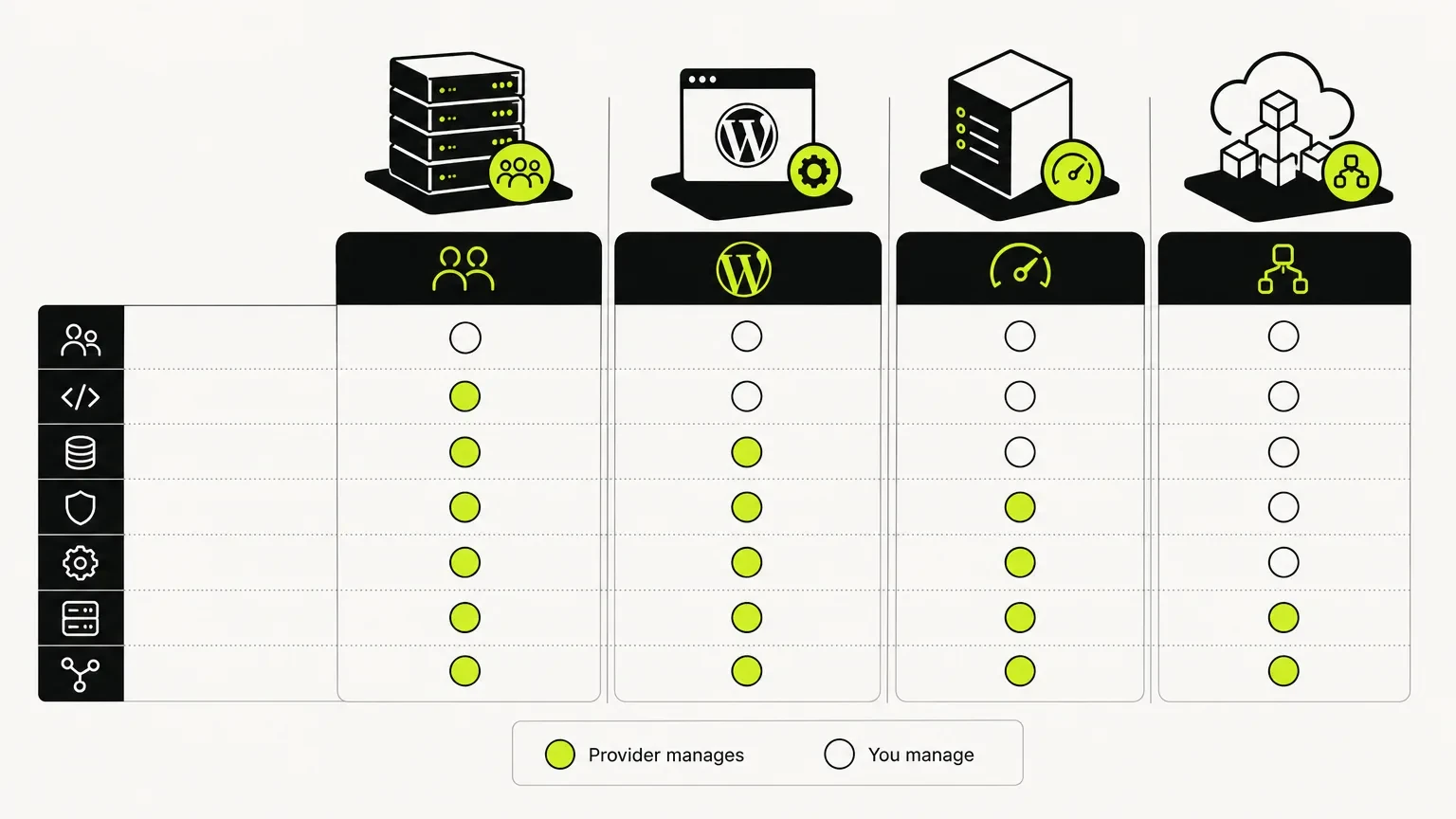
An easy reference diagram to understand the responsibilities of each hosting model.
Traditional hosting gives the website owner more responsibility for updates, access control, and application security. Platform-managed services generally manage more infrastructure centrally, although account security and safe publishing practices still matter.
Confirm responsibility for:
SSL certificates
Server and runtime patches
CMS updates
Plugin or extension updates
Malware response
User permissions
Multi-factor authentication
Recovery after an account compromise
No hosting model removes the need for controlled account access. A managed platform cannot protect a business from weak passwords or unnecessary administrator accounts.
6. Scalability
Traffic allowances are only one concern. Also consider:
CMS item and page limits
Bandwidth
Database requirements
File storage
Localization
Number of editors
Form submissions
API and integration limits
Staging and deployment workflows
A service business with modest traffic but hundreds of location pages may encounter content limits before bandwidth becomes relevant. Compare the limits that match the site's actual growth plan.
7. Total operating cost
Add renewal fees, premium extensions, maintenance retainers, developer fixes, security products, and staff time. A low introductory price can obscure a costly operating model.
The relevant number is not “hosting per month.” It is the annual cost of keeping the website secure, current, and useful.
Shared Hosting
Shared hosting places many websites on common server resources. It can be appropriate for a simple website with modest traffic and a capable owner who accepts more hands-on management.
Its weaknesses usually appear when a site uses a heavy theme, several plugins, or inadequate caching. Resource limits can also make troubleshooting difficult because the customer has little infrastructure control.
Shared hosting may fit when:
The website has low traffic and low commercial risk
Functionality is basic
Price is the dominant constraint
Someone can manage updates and backups
Occasional troubleshooting will not disrupt lead generation
It is less suitable when the website supports paid campaigns, generates a meaningful share of enquiries, or requires several business-critical integrations.
Choose shared hosting when price is the dominant constraint and the website has low technical complexity. Avoid choosing it solely because the first term looks inexpensive.
Managed WordPress Hosting
Managed WordPress hosting can improve caching, backups, staging, and server security for WordPress websites. It is often a sensible choice when WordPress is genuinely required.
It does not remove all maintenance. Plugins can conflict. Themes can become outdated. Custom code can fail after an update. The host may assist, but application maintenance remains part of the operating model.
The business should establish who owns four separate layers:
Hosting infrastructure
WordPress core
Themes and plugins
Custom integrations and front-end behavior
A managed host may cover the first two while leaving the agency or website owner responsible for the rest. That can still be a good arrangement, but it should be understood and budgeted.
WordPress remains appropriate for extensive publishing operations, WooCommerce, and sites requiring its ecosystem. Our Framer SEO versus WordPress comparison explains where each platform tends to fit.
VPS and Cloud Hosting
A virtual private server or configurable cloud environment provides more control over resources and software. That control is useful for custom applications, unusual integrations, and technical teams with specific deployment requirements.
The monthly infrastructure fee is only part of the cost. Someone must also handle:
Environment configuration
Runtime and operating-system updates
Monitoring and alerts
Access policies
Backup configuration
Scaling rules
Incident response
Deployment failures
For a typical service-business marketing website, this may create responsibility without creating meaningful customer value. Visitors do not care whether the business controls its server. They care whether the website loads quickly, explains the service, and makes contact easy.
Choose VPS or cloud hosting because the website has a documented technical requirement and qualified people are available to manage it. Do not choose it because server control sounds more professional.
Platform-Managed Hosting
Platforms such as Framer integrate website creation, publishing, and hosting. The platform manages infrastructure, deployment, and core updates. This reduces the number of systems the business must coordinate.
For many service businesses, that is the main benefit. The owner can focus on service pages, proof, and content rather than hosting dashboards and plugin compatibility.
Platform-managed hosting can reduce responsibility for:
Server configuration
Core infrastructure updates
Deployment tooling
CDN setup
SSL management
Traditional plugin maintenance
It does not make the website self-managing. The business still needs to maintain content, check forms, control user access, review integrations, and improve pages as its offer changes.
The principal trade-off is reduced server-level control. A business requiring a custom backend, advanced commerce system, or unusual database architecture may need a different platform.
Framer is strongest for modern marketing websites, service-business sites, portfolios, landing pages, and manageable CMS collections. Our Framer website development service explains how we approach the complete build rather than treating hosting as an isolated purchase.
What the Responsibility Difference Looks Like in Practice
Consider a service company that discovers its enquiry form stopped sending leads after an update.
On shared hosting, the host may confirm that the server and email service are running. The owner must then identify whether the failure comes from the CMS, form plugin, spam protection, mail configuration, or CRM connection.
On managed WordPress hosting, support may provide better WordPress-specific diagnostics. The host might restore a backup or identify a plugin error, but the agency or owner may still need to repair the form and test the CRM workflow.
On a VPS or cloud server, the technical team has more diagnostic access. It also owns more of the investigation, including server logs, runtime configuration, and deployment history.
On a platform-managed site, there are fewer infrastructure and plugin layers to inspect. The form or integration can still fail, but the diagnosis is usually narrower because the platform manages the underlying hosting and deployment environment.
Responsibility | Shared hosting | Managed WordPress | VPS or cloud | Platform-managed |
|---|---|---|---|---|
Server patching | Usually provider | Usually provider | Business or technical partner unless explicitly managed | Platform |
CMS core updates | Business or website partner | Provider, business, or shared responsibility | Business or technical partner | Platform |
Plugin and theme compatibility | Business or website partner | Business or website partner | Business or technical partner | Usually not applicable in the traditional sense |
Backup setup | Depends on plan | Often included, but verify retention and restoration | Business or technical partner unless included | Platform-defined |
Form and CRM troubleshooting | Business or website partner | Usually business or website partner | Technical or website partner | Business, website partner, or integration provider |
Infrastructure monitoring | Provider | Provider | Business or technical partner unless managed | Platform |
This is why a list of storage and bandwidth allowances does not settle the decision. The better model is the one that gives the business a clear and affordable route from problem to resolution.
Common Hosting Misconceptions
“Managed hosting means the whole website is managed”
It may mean only that the hosting company manages its infrastructure. Plugin conflicts, content errors, broken tracking, and CRM integrations can remain outside support.
“More server control is always better”
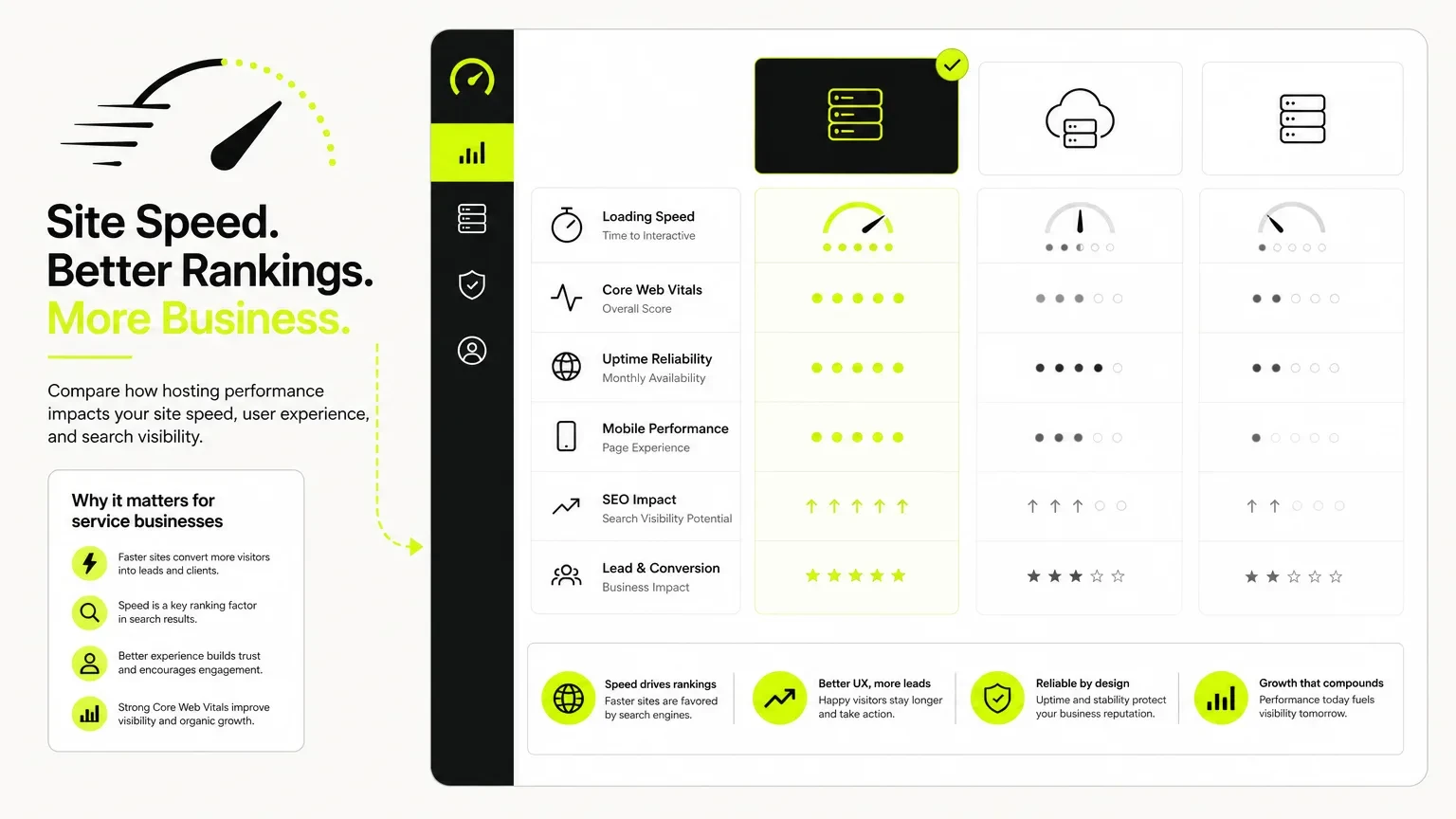
A mockup showcasing key performance indicators crucial for service businesses evaluating hosting options.
Control has value when a requirement uses it. Otherwise, it creates more decisions, more access to protect, and more systems to maintain.
“High uptime means the lead system is dependable”
A website can remain online while a form, scheduling tool, payment flow, or CRM connection is broken. Infrastructure uptime and complete customer-journey reliability are different measures.
“Unlimited hosting has no practical limits”
Plans described as unlimited can still operate under acceptable-use, resource, file, traffic, or application constraints. Read the current plan terms and ask what happens when usage increases.
“Fast hosting will solve SEO problems”
Hosting can support speed and availability. It cannot repair weak service pages, unclear navigation, missing location relevance, poor internal linking, or an offer that visitors do not understand.
“Business email should stay with the website host”
Bundling can be convenient, but it can also complicate a future migration. Separating business email from website hosting may reduce the number of critical systems affected by a platform change.
Watch for Misleading Price Comparisons
Before comparing totals, normalize the terms:
Is the displayed rate introductory?
How long is the required commitment?
What is the renewal price?
Are taxes included?
Are backups included?
Is restoration included?
Is email hosting included or separate?
Are migrations included?
Are traffic or bandwidth limits enforced?
Does staging cost extra?
Are security products separate?
Who handles updates?
What happens if the website exceeds a limit?
How much does cancellation or migration cost?
A platform plan costing more per month may still cost less to operate if it replaces several plugins, security products, and maintenance tasks.
The reverse can also be true. A platform may become expensive if the business needs functionality that requires external tools or exceeds its content limits. Compare the complete operating system, not one subscription.
Be careful with provider tables that place an introductory shared-hosting plan beside a platform-managed website plan. They may both publish a website, but they transfer very different responsibilities to the buyer.
Build a Three-Year Cost Comparison
Promotional pricing makes a one-month comparison unreliable. Use a three-year view instead.
For each option, calculate:
Platform or hosting fees: Use the renewal price, not only the introductory rate.
Premium extensions: Include themes, plugins, form tools, security products, and backup services.
Maintenance: Add retainers or expected developer time for updates and troubleshooting.
Internal staff time: Estimate the hours spent coordinating vendors, publishing changes, and resolving problems.
Performance work: Include recurring optimization if the stack tends to accumulate scripts or code overhead.
Incident costs: Consider restoration, malware cleanup, and emergency developer support.
Migration cost: Include the work required to leave the platform or host if requirements change.
Use a worksheet rather than relying on memory:
Cost category | Year 1 | Year 2 | Year 3 | Three-year total |
|---|---|---|---|---|
Hosting or platform subscription | ||||
Premium themes, plugins, or extensions | ||||
Backup and security products | ||||
Routine developer maintenance | ||||
Internal staff time | ||||
Expected performance work | ||||
Incident allowance | ||||
Expected migration or rebuild allowance | ||||
Total |
Do not assign an invented dollar value to downtime or lost enquiries. Use the business's actual lead value and website dependency. A company receiving most of its opportunities through referrals will assess the risk differently from one funding a large paid-search campaign.
This calculation also helps with redesign planning. If hosting complexity is only one part of an outdated website, compare it within the wider project rather than moving the same problems to a different server. Our guide to website redesign cost explains the other scope decisions that affect the budget.
Service-Business Hosting Scorecard
The following scorecard compares operating fit rather than individual providers. Ratings are directional because implementation quality still matters.
Priority | Shared hosting | Managed WordPress | VPS or cloud | Platform-managed |
|---|---|---|---|---|
Low infrastructure maintenance | Low | Medium | Low | High |
Server-level control | Low | Medium | High | Low |
Fit for a standard marketing website | Medium | High | Medium | High |
Fit for a custom web application | Low | Medium | High | Low to medium |
Technical skill required from the business or its partner | Medium | Medium | High | Low to medium |
Access to a large extension ecosystem | Depends on CMS | High | High | Medium |
Predictable deployment workflow | Low to medium | Medium to high | Depends on team | High |
Responsibility concentrated with one platform | Low | Medium | Low | High |
Use the scorecard to expose the real trade-off. If low maintenance and marketing-site performance are priorities, platform-managed hosting deserves serious consideration. If custom application control is essential, a VPS or cloud environment may be worth the operational burden.
A Practical Selection Framework
Choose shared hosting if the website is simple, risk is low, and someone can maintain it.
Choose managed WordPress hosting if WordPress is the right CMS and the business wants specialist infrastructure support while retaining access to its ecosystem.
Choose VPS or cloud hosting if documented application requirements justify server control and qualified technical staff are available.
Choose platform-managed hosting if the primary need is a fast, low-maintenance marketing website and the platform supports the required content and integrations.
Choose dedicated infrastructure only when security, compliance, traffic, or application requirements clearly demand it.
Before approving a plan, complete this checklist:
We have documented the website's required functionality.
We know who maintains the server or platform.
We know who maintains the CMS, plugins, and integrations.
We have checked renewal rather than introductory pricing.
We understand backup frequency and restoration responsibility.
We have confirmed the support team's boundaries.
We have checked content, bandwidth, editor, and integration limits.
We have calculated likely three-year operating costs.
We understand how the website can be migrated later.
We have assigned an owner for forms, analytics, and post-launch checks.
Treat these as warning signs during the sale:
The provider cannot explain what “managed” includes.
The recommendation is based mainly on storage or bandwidth.
Nobody has reviewed the website's CMS and integration requirements.
The renewal price is difficult to identify.
Backup availability is promoted without explaining restoration.
Support will not clarify whether application problems are covered.
The proposed server control has no documented business use.
Domain, email, and website ownership are being placed in an account the business cannot access.
If the decision involves moving an existing WordPress site, hosting is only one part of the project. URLs, redirects, metadata, content, forms, and analytics must also be protected. Use our WordPress-to-Framer migration checklist to plan the transition before changing platforms.
Hosting selection is also not the end of website management. Pages, conversion paths, and integrations still need attention after launch. Businesses that want ongoing improvements can review our Growth Partner Plan.
Choose the Responsibility Model You Actually Want
A useful website hosting services comparison shows more than storage, bandwidth, and an introductory price. It shows who will keep the infrastructure secure, who will maintain the website application, and who will respond when a lead-generating feature fails.
For a service-business marketing website, lower operational complexity is often more valuable than unrestricted server access. Choose control only when the business has a real use for it and the technical capacity to manage it.
If a platform-managed website fits those requirements, we can help plan and build the site through our Framer website development service. The platform, hosting model, content structure, and conversion path should be decided as one system, not purchased as separate technical parts.
Platform-managed hosting or a reputable managed CMS service is often the most practical choice. The correct answer depends on the website's required functionality, publishing volume, and available technical support. A standard marketing website generally benefits more from low maintenance and dependable publishing than from server access. A custom application may justify a VPS or cloud environment.
No. It can reduce infrastructure work, but the extent depends on the service. Managed WordPress hosting does not automatically maintain every plugin, theme, or custom integration. Platform-managed hosting removes more infrastructure tasks, but content, forms, accounts, and third-party integrations still require oversight.
Hosting can support faster delivery, reliability, and crawl access. It cannot compensate for weak content, poor structure, or a confusing user experience. Platform choice also affects how easy it is to maintain technical and on-page SEO. That broader distinction is covered in our Framer SEO versus WordPress guide.
Yes. Framer websites are published through Framer's managed platform infrastructure. Businesses do not need to purchase a separate traditional hosting account for the Framer site. The domain remains an important business asset and should stay under an account the business controls, even when an agency manages website publishing.
Usually not. Platform and hosting decisions affect each other. Determine the site's functional and content requirements first, then choose the operating model that supports them. Buying hosting first can restrict the platform decision or leave the business paying for an account it does not need.
Sometimes, but not always. Traditional hosting plans may bundle email, while platform-managed website services often expect the business to use a separate email provider. Keeping website hosting and business email separate can reduce disruption during a future website migration. Confirm the arrangement before changing DNS records.


